
How Agentation Cut Claude Code UI Iterations in Half
A Practical Look at the Tool That Finally Connects What Developers See with What AI Edits

AI-assisted UI development sounds efficient in theory. In practice, it often becomes a frustrating loop of miscommunication.
A developer opens the browser, sees a button that’s slightly off. Too bright. Wrong padding. Border radius feels wrong. A hover animation is jittery.
They open Claude Code and write:
“Make the button darker and rounder.”
Which button?
“The one in the sidebar.”
There are three.
“The second one.”
Claude updates the first.
Now the developer writes a detailed paragraph explaining its position, its neighbors, its class names, maybe even approximate coordinates — and still there’s a 50/50 chance the AI edits the wrong element.
This is not an intelligence problem.
It’s a context problem.
Agentation exists to fix exactly that.
And in real-world React workflows, it can reduce UI iteration time dramatically.
The Real Friction in AI UI Development
When developers collaborate with AI agents on UI changes, they usually rely on one of two imperfect approaches.
Screenshot + Description
“Here’s a screenshot. Make the button on the right darker.”
The AI sees pixels. It tries to infer which component produced them. It guesses based on layout, naming patterns, or proximity.
Sometimes it’s right.
Sometimes it changes something adjacent.
Sometimes it breaks styling entirely.
Pure Text Description
“In the Header component, the Submit button should be bigger.”
But what if there are multiple Submit buttons?
What if styles are inherited?
What if the component is reused elsewhere?
The core issue is simple:
There is no reliable bridge between what the developer sees in the browser and where that element lives in the codebase.
Humans think visually.
AI agents operate structurally.
Without a mapping between those worlds, iteration becomes inefficient and token-expensive.
What Agentation Actually Is
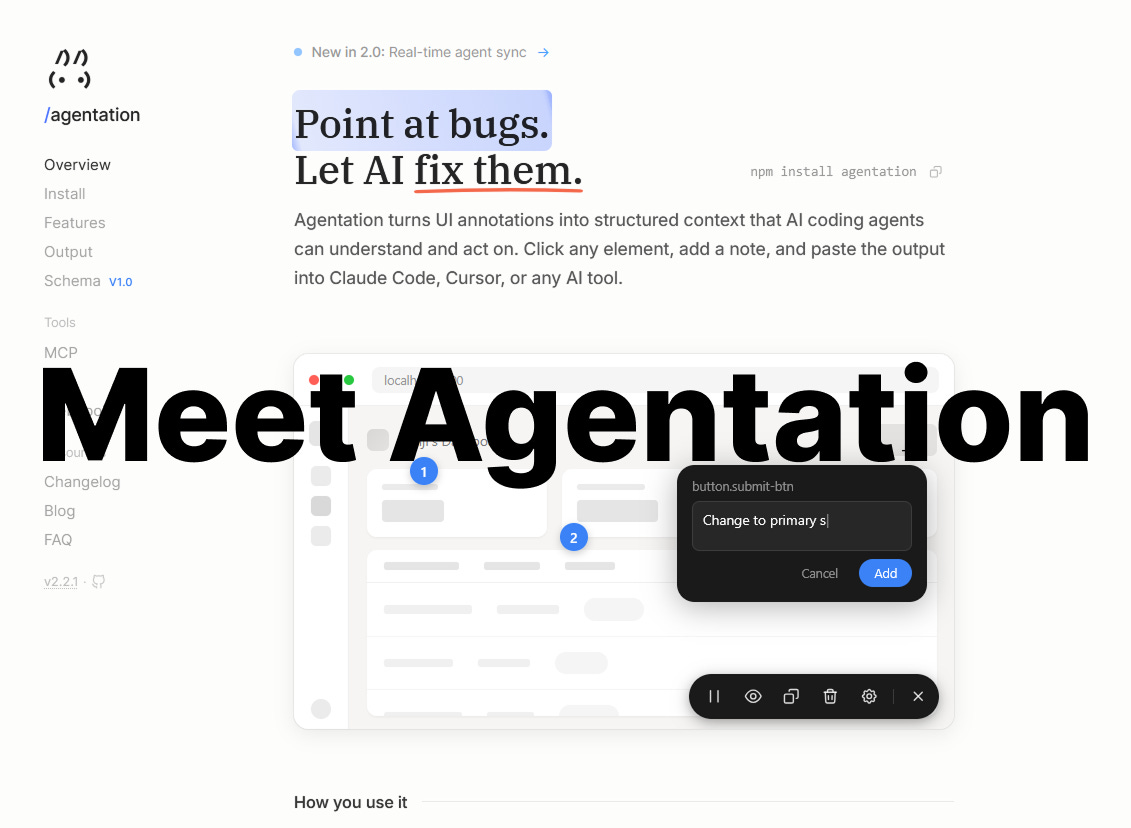
Agentation is a lightweight React development tool that adds an annotation layer to an application.
Instead of describing UI problems manually, a developer can:
Activate annotation mode
Click directly on any UI element
Write a short note
Generate structured Markdown with context
The output includes:
CSS selector
Class names
Element position (x/y/width/height)
Text content
DOM context
Optional computed styles
A typical annotation looks like this:
## Annotation
- Selector: .sidebar > button.primary
- Classes: btn, btn-primary, submit-action
- Position: x: 245, y: 180, width: 120, height: 40
- Text content: “Submit”
- Note: “Make this darker and add hover animation”
Instead of vague descriptions, the AI now receives precise structural data.
It knows exactly where to look.
Agentation does not replace the AI.
It improves the AI’s input.
The Features That Matter in Practice
The core feature is element capture. Clicking any element automatically extracts selectors, classes, and layout metadata.
Text can be highlighted directly, allowing precise correction of typos or spacing.
Multiple elements can be selected at once, which is useful for batch styling fixes.
Empty layout areas can also be annotated — for example, indicating that a section needs more spacing.
One standout feature is animation freezing.
Transient hover states and CSS transitions often exist for milliseconds. Agentation can freeze animations — CSS, JavaScript, even video playback — allowing developers to capture and annotate specific frames.
The output is plain Markdown. That means it works with Claude Code, Cursor, Windsurf, or any other AI that understands structured text.
What Agentation Does Not Do
It does not generate code.
It does not automatically refactor components.
It does not eliminate the need for an AI agent.
It strictly improves context delivery.
The AI still needs access to the codebase to implement changes. Agentation simply removes ambiguity.
Installation and First Steps
Agentation is intentionally minimal to integrate.
Step 1: Install
npm install agentation -D
# or
pnpm add agentation -D
It should remain a development dependency.
Step 2: Integrate Into the Application
For Next.js App Router (app/layout.tsx):
import { Agentation } from ‘agentation’;

export default function RootLayout({ children }) {
  return (
    <html>
      <body>
        {children}
        {process.env.NODE_ENV === “development” && <Agentation />}
      </body>
    </html>
  );
}
For Next.js Pages Router (pages/_app.tsx):
import { Agentation } from ‘agentation’;

export default function App({ Component, pageProps }) {
  return (
    <>
      <Component {...pageProps} />
      {process.env.NODE_ENV === “development” && <Agentation />}
    </>
  );
}
The development-only condition ensures Agentation never ships to production.
Once mounted, a small draggable toolbar appears in the corner of the screen.
Step 3: Creating the First Annotation
With the development server running:
Open the application in the browser.
Activate annotation mode via the toolbar.
Hover over elements to see them highlight.
Click the element that needs adjustment.
Add a note.
Click Add.
Copy the generated Markdown.
Paste it into Claude Code or Cursor.
The AI now receives structured, precise context.
Step 4 (Optional): Enable MCP for Real-Time Sync
Copy-paste works, but it adds friction.
Agentation 2.0 supports Model Context Protocol (MCP), allowing AI agents to retrieve annotations directly.
Install MCP:
npm install agentation-mcp
npx agentation-mcp init
npx agentation-mcp server
Add it to Claude’s configuration:
~/.claude/settings.json{
“mcpServers”: {
“agentation”: {
“command”: “npx”,
“args”: [”agentation-mcp”, “server”]
}
}
}Now Claude Code can:
Fetch annotations automatically
Mark items as in progress
Confirm completed fixes
Ask clarifying questions
The workflow becomes conversational instead of manual.
For Claude Code users, there is also a skill shortcut:
npx skills add benjitaylor/agentationThis can auto-detect the framework, install dependencies, and mount the component.
What Changed in Version 2.0
Two major improvements stand out.
First, MCP support removes the copy-paste bottleneck and enables real-time collaboration.
Second, React Component Detection allows the tool to surface component hierarchy instead of relying solely on DOM selectors.
Instead of a generated class selector like:
.css-1a2b3c > div > buttonIt can now show something closer to:
ProductCard > ActionButtonThis significantly improves AI’s ability to locate the correct file.
It does not eliminate ambiguity in very large projects, but it dramatically improves signal quality.
Strengths
Agentation’s biggest strength is conceptual clarity. It reduces ambiguity in AI-driven UI workflows.
Animation freezing is uniquely powerful.
MCP support modernizes the workflow.
It is open-source and lightweight.
Integration takes minutes.
Limitations
It supports React 18+ only.
It requires the AI to have access to the repository.
MCP requires configuration and is not universally supported.
It is intended for desktop development, not mobile debugging.
In very large codebases with many similar components, selector ambiguity can still occur.
It does not replace architectural thinking.
Who Should Actually Use It
Agentation makes the most sense for developers who:
Build React applications
Actively use AI agents for UI iteration
Frequently adjust layout and styling
Work with animations and transitions
Practice AI-assisted frontend workflows
It is less useful for backend-focused engineers or non-React projects.
Final Verdict
Agentation is not a revolution.
It is not a replacement for frontend engineering.
It is a small, focused tool that removes a specific friction point: translating visual feedback into structured context for AI.
For React developers already working with Claude Code or Cursor, it is absolutely worth testing.
Setup takes minutes.
In UI-heavy workflows, the reduction in iteration cycles can be noticeable — sometimes dramatic.
It does not eliminate debugging.
It does not eliminate decision-making.
It does not eliminate complexity.
It simply removes friction.
And in AI-assisted development, friction is often the real bottleneck.
Useful Links
agentation.dev — official website and documentation
github.com/benjitaylor/agentation — GitHub repository
agentation.dev/mcp — MCP integration documentation
benji.org/agentation — author’s post with demo and philosophy