
Keep React Responsive with Web Workers and useRef
Move expensive JavaScript work off the main thread without turning your React component into a mess.

JavaScript is very good at waiting.
A request can be in progress, a timer can be running, and the browser can continue doing other work while it waits. This is one of the reasons asynchronous JavaScript feels so natural in frontend applications.
Heavy computation is a different story.
Try running a sufficiently expensive calculation on the main thread and the browser has nowhere to hide. Rendering gets delayed, clicks stop responding, scrolling becomes choppy, and the whole application can appear frozen.
React doesn’t change that.
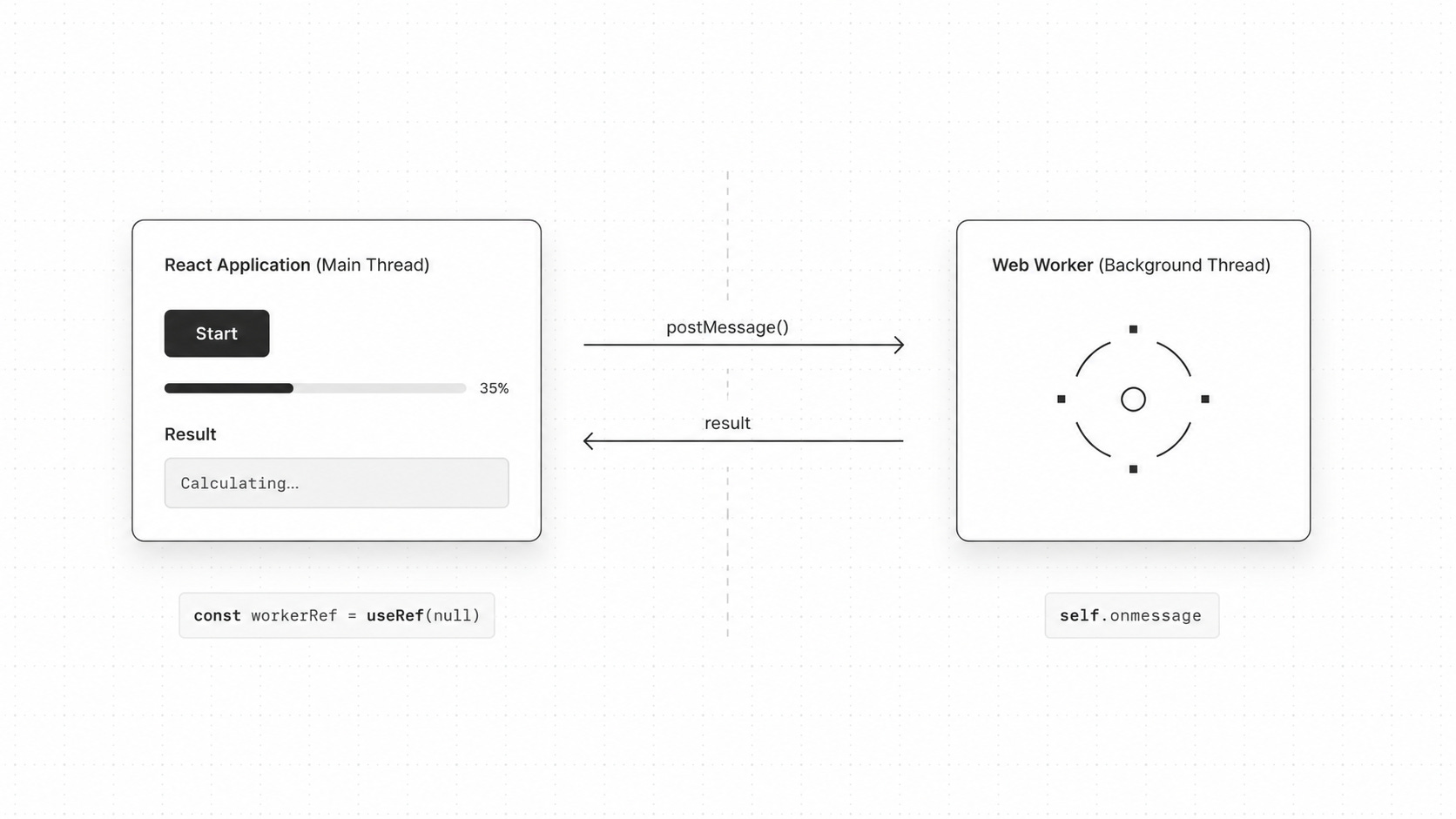
In this article, we’ll move that work into a Web Worker and keep the Worker instance around with useRef.
The basic setup will look like this:
React component
      |
      | postMessage()
      v
 Web Worker
      |
      | calculation
      |
      | postMessage()
      v
React component
      |
      v
     UI
There isn’t much code involved, but there are a few details worth understanding before putting everything together.
The Problem Isn’t Waiting
Let’s start without React.
Consider a deliberately expensive function:
function calculateTotal(iterations) {
  let total = 0;

  for (let i = 0; i < iterations; i++) {
    total += Math.sqrt(i);
  }

  return total;
}

const result = calculateTotal(100_000_000);

console.log(result);
Nothing here is asynchronous.
Once calculateTotal() starts running, JavaScript has to work through the loop before the current task can finish.
Put the same calculation behind a button in a browser:
button.addEventListener("click", () => {
  const result = calculateTotal(100_000_000);

  output.textContent = result;
});
Click it and you may notice the page becoming unresponsive until the calculation finishes.
The exact duration depends on the computer, browser, and workload, but the underlying problem is the same.
The main thread is busy.
Why async Doesn’t Fix CPU-Heavy Code
A common first instinct is to make the function asynchronous:
async function calculateTotal(iterations) {
  let total = 0;

  for (let i = 0; i < iterations; i++) {
    total += Math.sqrt(i);
  }

  return total;
}
That doesn’t move the loop to another thread.
The expensive calculation still has to run somewhere, and in this case it still runs on the main JavaScript thread.
Even wrapping the work in a timer only postpones the problem:
setTimeout(() => {
  calculateTotal(100_000_000);
}, 0);
The browser gets a chance to do other work before the callback starts. Once that callback begins executing, however, the calculation can still occupy the main thread.
This is an important distinction.
The event loop is great for coordinating asynchronous work. It doesn’t automatically turn CPU-heavy JavaScript into parallel work.
For that, the browser gives us Web Workers.
What Is a Web Worker?
A Web Worker runs JavaScript in a separate worker context.
That means a long calculation performed there doesn’t occupy the page’s main JavaScript thread in the same way.
Create one like this:
const worker = new Worker(
  new URL("./worker.js", import.meta.url),
  { type: "module" }
);
The browser loads worker.js separately and starts the Worker.
The Worker doesn’t have normal access to your page’s DOM.
This won’t work inside it:
document.querySelector("#app");Neither will code that expects the normal window object from a page.
That’s intentional.
A Worker is supposed to perform work separately and send the result back, rather than reaching into the page and changing UI elements directly.
It can still use many Web APIs that make sense outside the DOM, including fetch, timers, and other APIs available in worker contexts.
Our Worker
Let’s create a small worker:
// calculation.worker.js

self.addEventListener("message", (event) => {
  const { iterations } = event.data;

  let total = 0;

  for (let i = 0; i < iterations; i++) {
    total += Math.sqrt(i);
  }

  self.postMessage({
    type: "complete",
    result: total,
  });
});
There are two important pieces here.
First:
self.addEventListener("message", ...)This listens for messages sent to the Worker.
Then:
self.postMessage(...)sends a message back.
So our worker has a very small interface:
INPUT

{
  iterations: number
}

OUTPUT

{
  type: "complete",
  result: number
}
Thinking about worker communication as an API like this becomes useful once a Worker handles more than one operation.
Connecting the Worker to React
Now we need somewhere to keep the Worker instance.
A first attempt might be:
function Calculator() {
  const worker = new Worker(
    new URL("./calculation.worker.js", import.meta.url),
    { type: "module" }
  );

  // ...
}
Don’t do this.
A React component function can run again whenever React renders that component. Creating the Worker directly in the component body therefore risks creating another Worker on later renders.
We want one Worker associated with this mounted component.
That’s where useRef fits nicely.
Keeping the Worker in useRef
Start with:
import { useRef } from "react";

function Calculator() {
  const workerRef = useRef(null);

  // ...
}
The ref gives us an object with a current property:
workerRef.currentChanging that property doesn’t cause React to render the component again.
That’s exactly what we want.
The Worker itself isn’t UI state. React doesn’t need to repaint anything merely because workerRef.current contains a Worker instance.
Compare that with actual application state:
const [result, setResult] = useState(null);
const [isRunning, setIsRunning] = useState(false);
Those values affect what the user sees.
When result changes, the interface may need to display a new number. When isRunning changes, the button may need to become disabled.
The Worker instance is different.
We need to retain it, but we don’t need its existence to trigger rendering.
A ref is a good place for that kind of value.
Creating the Worker in an Effect
We’ll create the Worker when the component is mounted:
import { useEffect, useRef } from "react";

function Calculator() {
  const workerRef = useRef(null);

  useEffect(() => {
    const worker = new Worker(
      new URL("./calculation.worker.js", import.meta.url),
      { type: "module" }
    );

    workerRef.current = worker;

    return () => {
      worker.terminate();
      workerRef.current = null;
    };
  }, []);

  // ...
}
There are a couple of advantages to keeping this lifecycle logic together.
The effect creates the external resource.
Its cleanup destroys that same resource.
And the component body doesn’t create another Worker simply because React renders it again.
It’s better to think of this as resource lifecycle management than as a performance trick for “letting the first screen render first.”
Sending Work to the Worker
Once the Worker exists, sending it some data is straightforward:
function startCalculation() {
  workerRef.current?.postMessage({
    iterations: 100_000_000,
  });
}
The optional chaining is useful here:
workerRef.current?.postMessage(...)The ref initially contains null, so this avoids trying to call postMessage() before the Worker has been created.
Inside the Worker, our listener receives the object through event.data:
self.addEventListener("message", (event) => {
  const { iterations } = event.data;

  // ...
});
The direction is:
React
  |
  | { iterations: 100_000_000 }
  v
Worker
After finishing the calculation, the Worker sends another object back.
Receiving the Result
Let’s add the listener on the React side:
useEffect(() => {
  const worker = new Worker(
    new URL("./calculation.worker.js", import.meta.url),
    { type: "module" }
  );

  workerRef.current = worker;

  worker.addEventListener("message", (event) => {
    console.log(event.data);
  });

  return () => {
    worker.terminate();
    workerRef.current = null;
  };
}, []);
If the Worker sends:
self.postMessage({
  type: "complete",
  result: total,
});
then React receives:
event.datawith approximately this shape:
{
  type: "complete",
  result: 666666661666.567
}
The exact result isn’t important here.
What matters is that the expensive loop ran in the Worker while the main page remained available to handle rendering and interaction.
A Complete React Example
Now we can connect everything:
import { useEffect, useRef, useState } from "react";

export default function HeavyCalculator() {
  const workerRef = useRef(null);

  const [result, setResult] = useState(null);
  const [isRunning, setIsRunning] = useState(false);

  useEffect(() => {
    const worker = new Worker(
      new URL("./calculation.worker.js", import.meta.url),
      { type: "module" }
    );

    workerRef.current = worker;

    const handleMessage = (event) => {
      const message = event.data;

      if (message.type !== "complete") {
        return;
      }

      setResult(message.result);
      setIsRunning(false);
    };

    const handleError = (error) => {
      console.error("Worker failed:", error);
      setIsRunning(false);
    };

    worker.addEventListener("message", handleMessage);
    worker.addEventListener("error", handleError);

    return () => {
      worker.removeEventListener("message", handleMessage);
      worker.removeEventListener("error", handleError);
      worker.terminate();

      workerRef.current = null;
    };
  }, []);

  const startCalculation = () => {
    const worker = workerRef.current;

    if (!worker || isRunning) {
      return;
    }

    setResult(null);
    setIsRunning(true);

    worker.postMessage({
      iterations: 100_000_000,
    });
  };

  return (
    <main>
      <button
        type="button"
        onClick={startCalculation}
        disabled={isRunning}
      >
        {isRunning ? "Calculating..." : "Start calculation"}
      </button>

      {result !== null && (
        <p>Result: {result}</p>
      )}
    </main>
  );
}
And the Worker:
// calculation.worker.js

self.addEventListener("message", (event) => {
  const { iterations } = event.data;

  if (
    !Number.isInteger(iterations) ||
    iterations < 0
  ) {
    self.postMessage({
      type: "error",
      message: "Invalid iteration count",
    });

    return;
  }

  let total = 0;

  for (let i = 0; i < iterations; i++) {
    total += Math.sqrt(i);
  }

  self.postMessage({
    type: "complete",
    result: total,
  });
});
This is already enough for a useful implementation.
React owns the visible state.
The ref owns the Worker reference.
The Worker owns the expensive calculation.
useRef vs useState
It’s worth spending another minute on this distinction because it’s easy to misuse either hook.
Suppose we stored the Worker in state:
const [worker, setWorker] = useState(null);It can work, but what do we gain from making the Worker state?
Calling:
setWorker(newWorker);causes React to schedule another render.
Yet the rendered output probably doesn’t depend on the Worker object itself.
With a ref:
const workerRef = useRef(null);we can keep the same reference available between renders without asking React to render when it changes.
A useful rule of thumb is:
Does changing this value affect rendered output?

Yes -> state may be appropriate.

No, but I need the value to survive renders -> consider a ref.
It’s only a rule of thumb, but it maps nicely to Worker instances.
postMessage() in Both Directions
The message API can look confusing because both sides use postMessage().
The direction depends on who calls it.
From React:
worker.postMessage({
  type: "calculate",
  iterations: 100_000_000,
});
The Worker receives it:
self.addEventListener("message", (event) => {
  console.log(event.data);
});
Going the other way:
self.postMessage({
  type: "complete",
  result,
});
and the page receives it:
worker.addEventListener("message", (event) => {
  console.log(event.data);
});
You can picture the exchange like this:
MAIN THREAD                         WORKER

worker.postMessage(data)
        -------------------------->

                             message event
                             event.data


                             self.postMessage(result)
        <--------------------------

message event
event.data
Once that direction is clear, the API becomes fairly simple.
Give Messages a type
Our first message could have been:
{
  iterations: 100_000_000
}
For a tiny demo, that’s enough.
Real Workers tend to grow.
Maybe tomorrow we want to cancel a task, process a different calculation, or report progress.
Instead of relying on the shape of the object, give messages explicit types:
worker.postMessage({
  type: "calculate",
  payload: {
    iterations: 100_000_000,
  },
});
Then the Worker can handle several commands:
self.addEventListener("message", (event) => {
  const { type, payload } = event.data;

  switch (type) {
    case "calculate":
      runCalculation(payload);
      break;

    default:
      console.warn(`Unknown worker message: ${type}`);
  }
});
The response can follow the same convention:
self.postMessage({
  type: "result",
  payload: {
    result,
  },
});
This costs a few extra lines but makes the communication protocol much easier to extend.
Reporting Progress
Long calculations present another problem.
The page no longer freezes, which is good, but the user may still stare at “Calculating...” for several seconds.
The Worker can send intermediate messages.
For example:
self.addEventListener("message", (event) => {
  const { iterations } = event.data.payload;

  let total = 0;

  for (let i = 0; i < iterations; i++) {
    total += Math.sqrt(i);

    if (i > 0 && i % 1_000_000 === 0) {
      self.postMessage({
        type: "progress",
        payload: {
          progress: i / iterations,
        },
      });
    }
  }

  self.postMessage({
    type: "result",
    payload: {
      result: total,
    },
  });
});
React can respond differently depending on the message:
const handleMessage = (event) => {
  const { type, payload } = event.data;

  if (type === "progress") {
    setProgress(payload.progress);
    return;
  }

  if (type === "result") {
    setResult(payload.result);
    setProgress(1);
    setIsRunning(false);
  }
};
Now the Worker is doing more than keeping the UI responsive.
It’s also giving the UI enough information to tell the user what’s happening.
Cleaning Up the Worker
A Worker is an external resource with its own lifetime.
If the React component that owns it disappears, we don’t want the Worker continuing indefinitely for no reason.
That’s why the effect returns a cleanup function:
return () => {
  worker.terminate();
  workerRef.current = null;
};
terminate() stops the Worker.
Then we clear our stored reference because that Worker should no longer be used by the component.
Using the local worker variable for termination is also slightly cleaner than relying on whatever happens to be in workerRef.current when cleanup runs.
Our effect therefore follows a familiar resource pattern:
mount
  |
  v
create Worker
  |
  v
use Worker
  |
  v
unmount
  |
  v
terminate Worker
If you create an external resource in an effect, thinking about its cleanup at the same time is a good habit.
What About React Strict Mode?
During development, React may run an extra setup and cleanup cycle for Effects under Strict Mode.
That can make Worker lifecycle code look surprising when you’re watching logs.
The important part is that setup and cleanup are symmetrical:
useEffect(() => {
  const worker = new Worker(...);

  return () => {
    worker.terminate();
  };
}, []);
If React performs a development-only setup, cleanup, setup sequence, the first Worker is terminated before the next one becomes the active resource.
That’s another reason not to scatter Worker creation across the component.
Keep creation and destruction together.
Worker Files in Modern Build Tools
With modern module-aware build tools, this form is common:
new Worker(
  new URL("./calculation.worker.js", import.meta.url),
  { type: "module" }
);
import.meta.url refers to the current module URL.
The relative Worker path can therefore be resolved from the module that creates it, while the build tool gets a chance to recognize and process the Worker dependency.
You may also encounter examples such as:
new Worker("/worker.js");That normally refers to a file served directly from the site’s public root.
The right version depends on how the application is built.
For source files that belong to the module graph, I generally prefer the new URL(..., import.meta.url) form when the project’s tooling supports it.
Workers Don’t Make Calculations Faster by Magic
This is an important caveat.
Moving:
calculateTotal(100_000_000);into a Worker doesn’t necessarily make that calculation itself dramatically faster.
What we’ve changed is where the work happens.
The big UX improvement is that the main thread is no longer tied up doing that work, so the page can remain responsive.
Workers also have overhead.
Creating a Worker isn’t free, and messages between execution contexts have costs as well.
That means you probably don’t need a Worker for this:
const total = prices.reduce(
  (sum, price) => sum + price,
  0
);
For a tiny operation, Worker overhead can cost more than the work you’re trying to move.
When a Web Worker Makes Sense
Workers become interesting when a task is expensive enough to noticeably affect the main thread.
Typical examples include:
processing large datasets
parsing or transforming large files
image processing
expensive mathematical calculations
simulations
compression
some cryptographic workloads
complex data analysis
A network request is a different case.
You usually don’t need a Worker just because you’re calling:
await fetch("/api/products");Waiting for a response isn’t the same problem as spending several seconds crunching numbers on the main thread.
Don’t Send More Data Than You Need
Messages often involve data being transferred or cloned between contexts.
So this:
worker.postMessage({
  entireApplicationState,
});
is usually a warning sign.
Prefer sending the smallest useful payload:
worker.postMessage({
  type: "calculate",
  payload: {
    values,
  },
});
If you’re dealing with large binary buffers, it’s also worth learning about transferable objects. They can avoid some of the copying costs associated with moving certain data between contexts.
For a basic React Worker, though, plain structured messages are a perfectly good place to start.
A Small useWorker Hook
Once several components need the same pattern, the lifecycle code can be extracted.
Here’s a deliberately small version:
import { useEffect, useRef } from "react";

export function useWorker(url, onMessage, onError) {
  const workerRef = useRef(null);
  const onMessageRef = useRef(onMessage);
  const onErrorRef = useRef(onError);

  onMessageRef.current = onMessage;
  onErrorRef.current = onError;

  useEffect(() => {
    const worker = new Worker(url, {
      type: "module",
    });

    workerRef.current = worker;

    const handleMessage = (event) => {
      onMessageRef.current?.(event.data);
    };

    const handleError = (event) => {
      onErrorRef.current?.(event);
    };

    worker.addEventListener("message", handleMessage);
    worker.addEventListener("error", handleError);

    return () => {
      worker.removeEventListener("message", handleMessage);
      worker.removeEventListener("error", handleError);
      worker.terminate();

      workerRef.current = null;
    };
  }, [url]);

  return workerRef;
}
Then a component can focus on what it actually wants the Worker to do:
const workerRef = useWorker(
  workerUrl,
  (message) => {
    if (message.type === "result") {
      setResult(message.payload.result);
    }
  },
  (error) => {
    console.error(error);
  }
);
I wouldn’t start with an abstraction like this for your first Worker.
Write the direct version first. Once you’ve repeated the pattern enough to understand what is actually shared, extracting a hook becomes much easier.
Putting the Pieces Together
The final architecture is quite small:
React renders component
        |
        v
useEffect creates Worker
        |
        v
useRef keeps Worker reference
        |
        v
User starts calculation
        |
        v
worker.postMessage()
        |
        v
Worker performs expensive work
        |
        v
self.postMessage()
        |
        v
React updates state
        |
        v
UI renders result
Then, when the component goes away:
Effect cleanup
      |
      v
worker.terminate()
      |
      v
workerRef.current = null
Each piece has one job.
useState stores values that affect the interface.
useRef keeps the Worker instance between renders.
useEffect manages the Worker’s lifecycle.
The Worker handles the expensive computation.
Messages connect the two execution contexts.
Final Thoughts
Web Workers aren’t something every React component needs. Most application code is better left on the main thread, and normal asynchronous APIs already handle waiting without requiring another execution context.
The situation changes when JavaScript itself becomes the expensive part.
If a calculation is heavy enough to make scrolling stutter or buttons stop responding, moving it into a Worker can make a very noticeable difference. React doesn’t need special Worker support for this. A ref, an effect, and a small message protocol are usually enough.
The pattern is worth remembering:
useRef
   ↓
Worker instance
   ↓
postMessage
   ↓
background calculation
   ↓
message
   ↓
React state
Once that flow makes sense, using a Worker in React stops feeling like a special trick. It becomes another way to keep expensive work away from the part of the browser responsible for keeping your interface responsive.