
React useState Explained: From Basics to Best Practices
Master asynchronous updates, functional state, closures, and performance optimization with practical React examples.

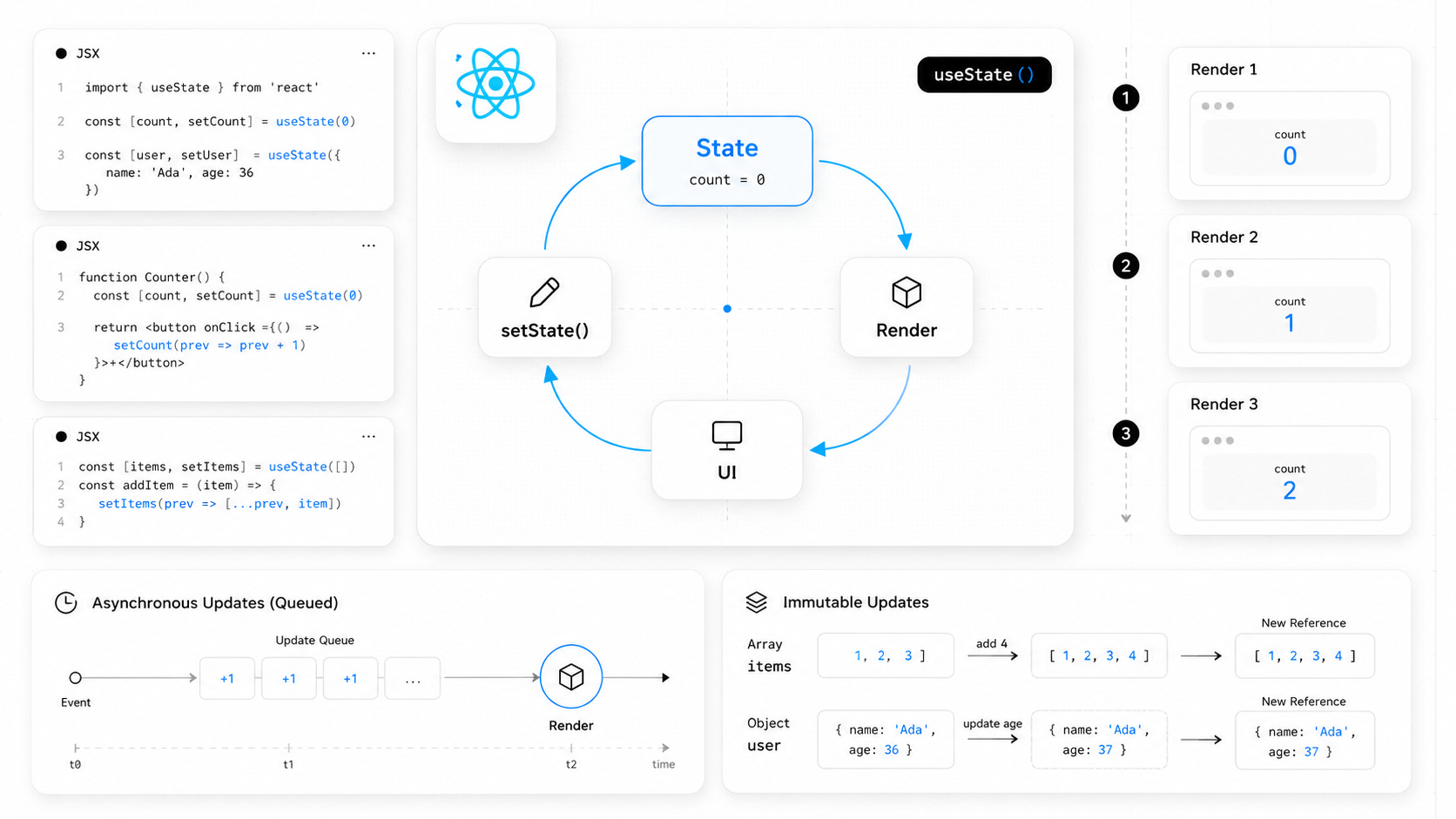
useState is often the first Hook developers learn when they start working with React. It looks simple, but many confusing bugs originate from incorrect assumptions about how it works.
Questions like these come up in almost every React project:
Why doesn’t state update immediately?
Why do three consecutive
setStatecalls only increase the value once?When should you use functional updates?
Why do some components become slower after every render?
The answers all come down to understanding how React manages state internally.
In this guide, you’ll learn the mechanics behind useState, avoid several common pitfalls, and discover patterns that make your components easier to maintain and faster to render.
Understanding useState
The useState Hook allows functional components to store values between renders. Every time the state changes, React renders the component again with the updated data.
import { useState } from "react";

export default function Counter() {
  const [count, setCount] = useState(0);

  return (
    <button onClick={() => setCount(count + 1)}>
      Clicked {count} times
    </button>
  );
}
useState returns two values:
the current state
a function that schedules a state update
Although this seems straightforward, it’s important to remember that calling the setter does not immediately change the variable you’re currently reading.
React Doesn’t Mutate State
Many developers imagine that this happens:
count = count + 1;React doesn’t work like that.
Instead, calling a setter tells React that the component should be rendered again with new state.
A simplified view of the process looks like this:
Your event handler runs.
React stores the requested update.
The current function continues executing.
React schedules a new render.
The component runs again with fresh state values.
React updates the DOM only where changes occurred.
Every render is an entirely new function execution with its own snapshot of state.
Understanding this idea makes many React behaviors suddenly make sense.
Why State Doesn’t Update Immediately
One of the most common surprises looks like this:
const handleClick = () => {
  setCount(count + 1);

  console.log(count);
};
You might expect the console to print the new value.
Instead, it prints the previous one.
This isn’t a bug. It’s how React is designed.
The count variable belongs to the current render. Calling setCount() schedules another render, but it doesn’t modify the values captured inside the current function.
Think of each render as taking a snapshot.
Once that snapshot exists, every variable inside it remains unchanged until React renders the component again.
Why React Uses Asynchronous Updates
React delays state updates for performance reasons.
Imagine clicking a button that updates five different pieces of state.
Without batching, React would render the component five separate times.
Instead, React groups those updates together and performs only one render.
const handleCheckout = () => {
  setLoading(true);
  setItems(updatedItems);
  setTotal(newTotal);
  setDiscount(discount);
  setSuccess(true);
};
Although five setters are called, React typically performs just one render.
This batching behavior reduces unnecessary work and keeps applications responsive.
The Render Timeline
Here’s what happens when a user clicks a button.
User clicks button
        │
        ▼
Event handler starts
        │
        ▼
setCount() queues an update
        │
        ▼
Remaining code continues running
        │
        ▼
Event handler finishes
        │
        ▼
React processes queued updates
        │
        ▼
Component renders again
        │
        ▼
DOM updates
The important point is that state isn’t updated while the current event handler is still running.
The Classic Stale Closure Problem
Consider this function.
const increaseThreeTimes = () => {
  setCount(count + 1);
  setCount(count + 1);
  setCount(count + 1);
};
Many developers expect the value to increase by three.
Instead, it only increases once.
Why?
Because every call reads exactly the same value of count.
If the current render has count = 0, then React receives these updates:
setCount(1);
setCount(1);
setCount(1);
Since every update requests the same value, the final result is simply:
count = 1;The problem isn’t batching.
The real issue is that every calculation uses the same state snapshot captured by the current render.
Functional Updates: The Correct Way to Update State
The previous example failed because every setCount() call used the same value captured by the current render.
React provides a built-in solution for this problem.
Instead of calculating the next value yourself, pass a function to the setter.
const increaseThreeTimes = () => {
  setCount(prev => prev + 1);
  setCount(prev => prev + 1);
  setCount(prev => prev + 1);
};
Now the counter increases by 3, exactly as expected.
Each callback receives the latest value from React’s update queue rather than the value captured by the current closure.
The execution looks like this:
Initial value: 0

First update:
0 → 1

Second update:
1 → 2

Third update:
2 → 3
Even though React still performs only one render, every update is applied in order.
When Should You Use Functional Updates?
A good rule is simple:
If the next state depends on the previous state, always use a functional update.
Typical examples include:
setCount(prev => prev + 1);

setItems(prev => [...prev, newItem]);

setLikes(prev => prev + 1);

setExpanded(prev => !prev);
This approach avoids stale values and makes your code safe even when multiple updates happen in the same event.
Functional Updates in Asynchronous Code
Stale closures become even more obvious when asynchronous code is involved.
Imagine this component:
const handleSave = () => {
  setTimeout(() => {
    setCount(count + 1);
  }, 1000);
};
If count changes during that second, the callback still uses the old value captured when the timer was created.
Using a functional update solves the issue immediately.
const handleSave = () => {
  setTimeout(() => {
    setCount(prev => prev + 1);
  }, 1000);
};
The callback no longer depends on an outdated snapshot.
Instead, React always provides the newest state available when the update is processed.
The same pattern should be used for:
API requests
WebSocket events
intervals
timers
Promise callbacks
optimistic UI updates
Whenever there’s a delay between reading and updating state, functional updates are usually the safest option.
Don’t Store Derived State
One of the most common React mistakes is storing data that can already be calculated from existing state.
Consider a searchable user list.
const [users, setUsers] = useState<User[]>([]);
const [search, setSearch] = useState("");
A beginner might create another state variable:
const [filteredUsers, setFilteredUsers] = useState<User[]>([]);Then keep it synchronized with an effect.
useEffect(() => {
  setFilteredUsers(
    users.filter(user =>
      user.name.toLowerCase().includes(search.toLowerCase())
    )
  );
}, [users, search]);
Although this works, it introduces unnecessary complexity.
Now two pieces of state represent the same information.
Whenever one changes, the other must also stay synchronized.
Eventually, they drift apart and bugs appear.
Calculate Derived Data Instead
The filtered list isn’t independent state.
It’s simply a different view of the original data.
Calculate it directly during rendering.
const filteredUsers = users.filter(user =>
  user.name.toLowerCase().includes(search.toLowerCase())
);
This version is:
shorter
easier to understand
impossible to get out of sync
easier to test
A useful guideline is:
Store the minimum amount of state. Compute everything else.
Keeping a single source of truth makes components significantly easier to maintain.
When Filtering Becomes Expensive
For small arrays, calculating derived values during every render is perfectly fine.
Large datasets are different.
Imagine filtering 100,000 records while the user types into a search box.
Repeating that calculation on every render can become expensive.
In those situations, useMemo is the right optimization.
const filteredUsers = useMemo(() => {
  const keyword = search.toLowerCase();

  return users.filter(user =>
    user.name.toLowerCase().includes(keyword)
  );
}, [users, search]);
React now recomputes the filtered list only when either dependency changes.
Every other render reuses the cached result.
Lazy Initialization
Another mistake appears before the component even finishes rendering.
Suppose generating the initial state is expensive.
const [users] = useState(generateLargeDataset());This looks harmless.
However, generateLargeDataset() executes every time the component renders.
React ignores the returned value after the first render, but JavaScript still runs the function on every render, wasting CPU time.
Initialize Expensive State Only Once
Instead, pass a function to useState.
const [users] = useState(() => generateLargeDataset());Or even shorter:
const [users] = useState(generateLargeDataset);Now React calls the function only once, during the component’s initial mount.
Future renders reuse the stored state without repeating the expensive computation.
This pattern is especially useful when initialization involves:
parsing large JSON files
reading data from
localStoragegenerating thousands of objects
building lookup tables
processing complex configuration data
For lightweight values like strings, numbers, or booleans, lazy initialization isn’t necessary.
Reserve it for work that would noticeably slow down rendering.
Putting Everything Together
Let’s combine the concepts from this guide into a realistic example.
This component demonstrates:
lazy initialization
controlled inputs
derived state
useMemofunctional updates
immutable state management
import { useMemo, useState } from "react";

interface User {
  id: number;
  name: string;
}

function generateUsers(): User[] {
  return Array.from({ length: 1000 }, (_, index) => ({
    id: index + 1,
    name: `User ${index + 1}`,
  }));
}

export default function UserDirectory() {
  // Expensive initialization runs only once.
  const [users, setUsers] = useState(generateUsers);

  // Independent state.
  const [search, setSearch] = useState("");

  // Derived state.
  const filteredUsers = useMemo(() => {
    const keyword = search.toLowerCase();

    return users.filter(user =>
      user.name.toLowerCase().includes(keyword)
    );
  }, [users, search]);

  const addUser = () => {
    setUsers(previous => [
      ...previous,
      {
        id: Date.now(),
        name: `User ${previous.length + 1}`,
      },
    ]);
  };

  return (
    <div>
      <input
        value={search}
        onChange={event => setSearch(event.target.value)}
        placeholder="Search users..."
      />

      <button onClick={addUser}>
        Add user
      </button>

      <ul>
        {filteredUsers.map(user => (
          <li key={user.id}>{user.name}</li>
        ))}
      </ul>
    </div>
  );
}
Although the component is small, it follows several important React patterns.
The original data exists in only one place.
The filtered list is calculated instead of stored.
Adding a new user relies on a functional update, making it safe even if multiple updates happen in rapid succession.
The expensive dataset is generated only once during the initial render.
These small decisions make a noticeable difference as your application grows.
Common Mistakes to Avoid
Even experienced React developers occasionally fall into the same traps.
Expecting state to update immediately
setCount(count + 1);

console.log(count);
The value printed here always belongs to the current render.
If you need the updated value, wait for the next render or use a functional update.
Updating state from stale values
// Not ideal
setCount(count + 1);
setCount(count + 1);
Prefer this instead:
setCount(prev => prev + 1);
setCount(prev => prev + 1);
Whenever the next value depends on the previous one, functional updates are the safest choice.
Storing derived data
Avoid this:
const [filteredUsers, setFilteredUsers] = useState([]);If the value can be calculated from existing state or props, calculate it during rendering instead of storing another copy.
Mutating objects or arrays
React compares references, not object contents.
This won’t trigger predictable updates:
users.push(newUser);

setUsers(users);
Instead, always create a new array or object.
setUsers(prev => [...prev, newUser]);The same rule applies to objects.
setSettings(prev => ({
  ...prev,
  theme: "dark",
}));
Treat React state as immutable.
Running expensive code on every render
Avoid this:
const [data] = useState(loadLargeDataset());Use lazy initialization instead.
const [data] = useState(loadLargeDataset);The function runs only once, reducing unnecessary work during future renders.
Best Practices Checklist
Before adding a new piece of state, ask yourself a few questions.
Is this really state?
If the value can be calculated from existing state or props, don’t store it.
Compute it when rendering.
Does the new value depend on the previous one?
If the answer is yes, use a functional update.
setItems(prev => [...prev, item]);Is initialization expensive?
Wrap it in a function so React executes it only once.
const [cache] = useState(createCache);Am I mutating existing data?
Always return new objects and arrays.
React relies on reference changes to detect updates.
Is this calculation expensive?
If the answer is yes, consider useMemo.
If it’s cheap, keep the code simple.
Premature optimization often hurts readability more than it helps performance.
Conclusion
useState looks simple, but it sits at the heart of every React application.
Once you understand that each render creates its own snapshot of state, many confusing behaviors become completely predictable.
You’ll know why state updates don’t happen immediately.
You’ll understand why stale closures appear.
You’ll recognize when functional updates are required.
You’ll avoid duplicating derived state.
You’ll also know when lazy initialization and useMemo provide real performance benefits instead of unnecessary complexity.
The biggest improvement isn’t memorizing every React Hook.
It’s learning how React thinks about state.
Once that mental model clicks, you’ll write components that are easier to reason about, easier to debug, and much more resilient as your application grows.