
Stop Rewriting the Same useLocalStorage Hook
Every React developer eventually writes a custom localStorage hook. Most versions work until they don't. Here's what breaks, why it happens, and what a production-ready solution should actually handle

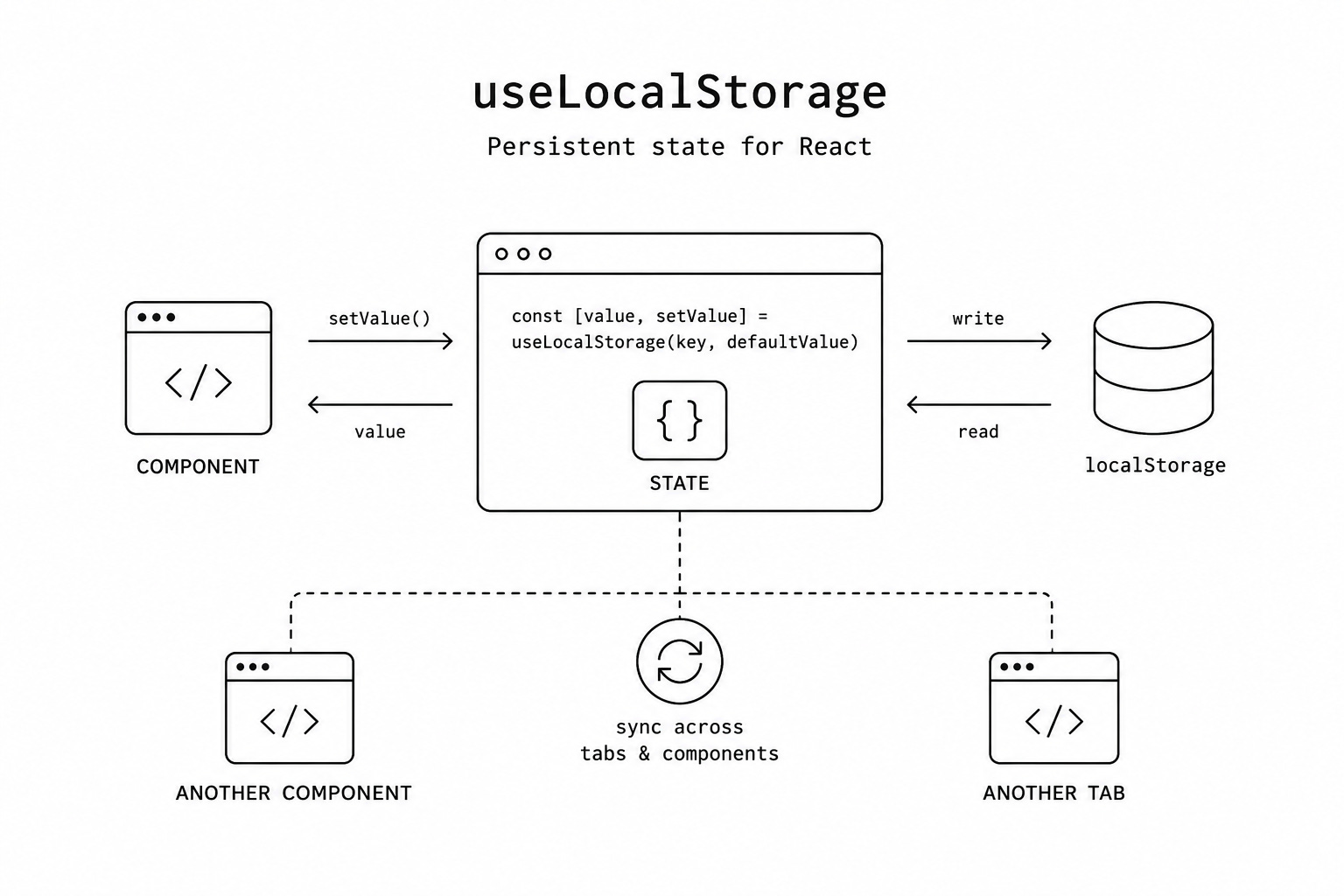
Every React developer has built some version of a persistent state hook.
A user spends several minutes configuring a dashboard, refreshes the page, and suddenly every preference is gone. The reason is simple: useState only exists for the lifetime of the current page.
The obvious solution is to combine useState, useEffect, and localStorage. It works for simple demos, but production applications quickly expose its weaknesses. Server-side rendering breaks, invalid data can crash the application, multiple browser tabs fall out of sync, and components using the same storage key can end up showing different values.
A proper useLocalStorage hook should solve all of those problems while feeling just like React’s built-in useState.
Why the Classic Solution Falls Short
Most custom implementations look something like this:
function usePersistedState(key, defaultValue) {
  const [value, setValue] = useState(() => {
    const stored = localStorage.getItem(key);
    return stored ? JSON.parse(stored) : defaultValue;
  });

  useEffect(() => {
    localStorage.setItem(key, JSON.stringify(value));
  }, [key, value]);

  return [value, setValue];
}
At first glance, nothing seems wrong.
In reality, this implementation introduces several subtle bugs.
The first problem is server-side rendering. During SSR there is no window object and no localStorage, so reading storage during initialization immediately throws an exception.
Even if you add a typeof window !== 'undefined' check, another issue appears. The server renders one value while the browser immediately renders another, producing hydration warnings and, in some cases, incorrect DOM updates.
Invalid Storage Can Break Your App
Local storage is not guaranteed to contain valid JSON.
Users can modify it manually. Browser extensions can overwrite it. Older versions of your application may have stored data using a different format.
Calling JSON.parse() without protection means a single corrupted value can prevent an entire component from rendering.
Production applications should always recover gracefully from malformed storage instead of crashing.
Browser Tabs Don’t Stay in Sync
Imagine a user opens your application in two tabs.
They switch from light mode to dark mode in one tab.
The other tab continues showing the old value until the page is refreshed.
A handwritten hook never notices the change because it doesn’t listen for the browser’s native storage event.
Good persistence should work across every open tab automatically.
Components Can Disagree With Each Other
This bug is even harder to notice.
Suppose two different components both call:
const [theme, setTheme] = usePersistedState("theme", "light");Each hook creates its own independent React state.
Updating one component doesn’t automatically update the other.
Now two parts of the same page disagree about what the current theme actually is.
One storage key.
Two different truths.
A Better API
A modern useLocalStorage hook should feel identical to useState.
const [layout, setLayout] =
  useLocalStorage("dashboard-layout", "grid");
You still receive a value and a setter.
Functional updates continue to work exactly as they do with useState.
The only visible difference is that the value survives page refreshes.
Automatic Serialization
localStorage only stores strings.
A good hook hides that implementation detail completely.
Objects, arrays, numbers and booleans should all work automatically.
Even more advanced types such as Set, Map and Date can be serialized and restored without additional code.
For unusual formats, custom serializers allow applications to stay compatible with legacy storage.
Removing Values Should Be Simple
Persistence has one operation that plain useState doesn’t.
Sometimes you don’t want to overwrite a value.
You want to remove it completely.
A clean API makes this straightforward.
setToken(null);Instead of storing "null" as a string, the storage key disappears entirely.
That distinction matters because “no stored value” and “default value” are not always the same thing.
SSR Should Work Without Hacks
Many developers wrap storage access inside typeof window checks.
That avoids crashes, but it doesn’t solve hydration issues.
A production-ready implementation should avoid accessing browser storage during server rendering altogether.
Hooks built on top of React’s useSyncExternalStore achieve exactly that.
The server renders predictable HTML.
The client then safely updates to the stored value without hydration warnings or mismatched DOM.
Storage Isn’t Always Available
Private browsing modes, browser restrictions and quota limits can all prevent access to local storage.
Instead of crashing, a resilient hook should gracefully fall back to an in-memory state and expose an error callback so the application can report the problem.
Users should lose persistence, not functionality.
Synchronization Everywhere
Persistence isn’t just about surviving refreshes.
State should also remain consistent everywhere it’s used.
A well-designed hook synchronizes changes between browser tabs using the native storage event.
It also synchronizes multiple components inside the same tab by broadcasting updates internally.
Every consumer always sees the latest value, regardless of where it changed.
Choosing the Right Storage
Not every piece of state belongs in localStorage.
React applications often need different persistence strategies.
useLocalStorage is ideal for settings that should survive browser restarts.
useSessionStorage keeps data only for the current tab.
Cookies are useful when the server needs access to the value during the initial request.
For real-time communication without persistence, BroadcastChannel is often the better choice.
Final Thoughts
Writing a useLocalStorage hook looks like a five-minute task.
Building one that behaves correctly in production is considerably harder.
A reliable implementation must handle server rendering, hydration, invalid data, browser limitations, cross-tab synchronization and multiple components sharing the same key.
Once those problems are solved, persistent state becomes as easy to use as useState, except your users no longer lose their work every time they refresh the page.